Voicethreads can be embedded in a blog or in an LMS. Below is a VoiceThread I created for the CVTC Building Connections book exploration.
Saturday, June 15, 2013


Tuesday, May 21, 2013
Start with Experience: EAT Apples and Carrots
Trey Mireles, instructor from Madison College, shared an instructional design approach during a TLT FridayLive event. He called it EAT
APPLES AND CARROTS. By this he meant to start a learning event with an experience and then build from there in this manner.
E: EXPERIENCE: a common reference point
Trey will be returning to FridayLive on May 24th and has offered to work with participants on how to apply EATAC with your content. You can join in this "stump the chump" event by clicking here to register. If you area TLT Member you will be able to listen to recording of both events.
 |
| tltgroup.org |
E: EXPERIENCE: a common reference point
A: APPLY: don't do for the learners what
they can do for themselves and each other
T:
TEACH: debrief, correct and delve deeper
A:
APPLY: go personal, go professional, give options
C:
CREATE!
It just so happened that I was designing a workshop for faculty and Trey offered to help FridayLive participants apply this approach. Below is my report on how the design worked.
Trey will be returning to FridayLive on May 24th and has offered to work with participants on how to apply EATAC with your content. You can join in this "stump the chump" event by clicking here to register. If you area TLT Member you will be able to listen to recording of both events.
Sunday, April 14, 2013
Two MOOCs start this Week: April 15th
MOOCs (Massive Open Online Course) have been called ”the single biggest change in education since the printing press” (Anant Agarwall, President edX). Zaid Alzagoff developed this comprehensive presentation, “Demystifying MOOCs”
Demystifying MOOCs! from Zaid Alsagoff
http://www.slideshare.net/zaid/demystifying-moocs
Educause has also assembled some great MOOC resources: http://www.educause.edu/library/massive-oen-online-course-mooc
My recommendation is to find a MOOC and check it out for yourself. I have participated in 3 and have learned something new each time. There are two MOOCs starting this week that I will be participating in. It would be fun to have you join me. Let me know if you will be testing the waters and we can meet to talk about our experiences, tweet me @luv2playgolf or comment below. Up-coming MOOC information:
http://www.slideshare.net/zaid/demystifying-moocs
Educause has also assembled some great MOOC resources: http://www.educause.edu/library/massive-oen-online-course-mooc
My recommendation is to find a MOOC and check it out for yourself. I have participated in 3 and have learned something new each time. There are two MOOCs starting this week that I will be participating in. It would be fun to have you join me. Let me know if you will be testing the waters and we can meet to talk about our experiences, tweet me @luv2playgolf or comment below. Up-coming MOOC information:
1. Instructional Design for Mobile Learning (#IDML13) – Free Professional Development This is a micro MOOC which means that it is focused with targeted skill building in the MOOC format. Kickoff event is 4/16/2013, 1pm CT April 15 - May 12, 2013.
Offered by the Blended Schools Network. They will be using Google Plus and SoftTalk Cloud. 5 weeks beginning 4/15/13.
Thursday, April 11, 2013
MOOC Guidelines begin to Emerge

Amy Woodgate returns to FridayLive tomorrow, April 12th, 2:00 PM ET to continue the conversation about MOOCs.
The #edcmooc "eLearning & Digital Cultures" MOOC is the TLT sMOOCher's second MOOC. This link will take you to the guidelines that have emerged from our previous conversations as captured by Steve Gilbert. We will continue to add to these guidelines and welcome your contributions as well. Comment below or add to the Google doc.
Tuesday, March 26, 2013
#EDCMOOC sounds like SOLE to me
"What is the future of learning?" This question was posed recently by Sugata Mitra in the TED talk "Build a School in the Cloud." Sugata Mitra supposes "Could it be that we don't need to go to school at all? Could it
be that at the point in time you need to know something you could find out in two minutes?"
I listened to this TED talk after completing the #EDCMOOC, "eLearning & Digital Cultures." During this experience it became clear to me the MOOCers direct their own learning. This is very similar to what Sugata Mitra is proposing.
He says "Learning is the product of educational self organization. If you allow the educational process to self organize, learning emerges. It's not about making learning happen it's about letting it happen." This last phrase caused me to remember how one of the EDCMOOC teachers referred to the MOOC. He called it "A Happening." The teachers in the MOOC truly did what Mitra is suggesting here. "The teacher sets the process in motion and then stands back and watches in awe as learning happens." His formula is broadband, collaboration and encouragement. This is exactly what I found in the MOOC Mitra refers to this as Self-Organized Learning Environments (SOLE). If you are interested in taking part in his research project check out the SOLE Toolkit.
 |
| http://www.ted.com/pages/sole_challenge#download |
I listened to this TED talk after completing the #EDCMOOC, "eLearning & Digital Cultures." During this experience it became clear to me the MOOCers direct their own learning. This is very similar to what Sugata Mitra is proposing.
He says "Learning is the product of educational self organization. If you allow the educational process to self organize, learning emerges. It's not about making learning happen it's about letting it happen." This last phrase caused me to remember how one of the EDCMOOC teachers referred to the MOOC. He called it "A Happening." The teachers in the MOOC truly did what Mitra is suggesting here. "The teacher sets the process in motion and then stands back and watches in awe as learning happens." His formula is broadband, collaboration and encouragement. This is exactly what I found in the MOOC Mitra refers to this as Self-Organized Learning Environments (SOLE). If you are interested in taking part in his research project check out the SOLE Toolkit.
Tuesday, March 12, 2013
TLT sMOOChers talk about #EDCMOOC
|
| TLT March 8th Conversation with Amy Woodgate |
Why is synchronous important?
How important is the power of voice and presence? I found the Google Hangouts in the EDCMOOC particularly refreshing, too. Do you think it was because it was one of the few times we , as students, were able to connect with the teachers? How many attendees participated in the edcmooc hangout? How many participants typically participate in the synchronous components of a MOOC?
What is the teacher role in a MOOC?
Although the multiple data streams from discussion boards, forums, Twitters, etc showed a very
energetic environment, I think the role of the teachers' should be explored and looked into....
How did you co-create these MOOCs?
What kind of (organisational) culture/attitude within UniEdinburgh - bottom-up/top-down, had you jumped on it and approached Coursera/did they approach you? Were there any particular champions within U Edinburgh who had imagineered UE MOOCs and how long had preparations begun prior to June 2012 sign-up? Did Coursera provide any assistance developing the courses? Do you think you got lucky with the community that formed around edcmooc? I have not experienced this with other moocs... there seemed to be some very enthusiastic students taking part who took it upon themselves to create their own spaces and build communities? I heard the MOOC on eLearning and Digital Culture deviated from the standard video lecture as the main form of delivery. Can you elaborate on the decisions that led to this? what was the reasoning behind the deviation from Coursera's standard method of video as the main content delivery?
Where/how were the MOOCs marketed?
I would like to discuss the financial aspects of course delivery, etc. Were the faculty compensated similarly to what their participation would have been for a traditional F2F course? How much did the course cost and did student income pay for it? What % of the students do you expect will pay in the future?
How do we to get other groups, pre-college educated feel comfortable to jump in? What are the MOOC naysayers saying? What are you seeing from the exit surveys? What is the overlap between those faculty threatened by MOOCs and those threatened by online education more generally?
What are your thoughts on best MOOC practices?
MOOCers: how much time did you spend on the MOOC each week?
What is your take on assessments in the MOOC?
Can online resources like TLT be a MOOC? Could you build a MOOC around an interactive ebook that people pay for?
Did any of the "traditional" courses that were run "simultaneously" on same topic as a MOOC, did anyone observe any notable changes? improvements, deficits in the "traditional" version as a consequence of the MOOC happening? I would love to hear more about how the MOOC changed your experience Amy as a student?
Tuesday, March 05, 2013
#EDCMOOC - sMOOChers Debrief with Amy Woodgate
TLT FridayLive!
sMOOChers Debrief with Amy Woodgate
March 8, 2013 2:00-3:00 pm Eastern Time - free to all.
Amy Woodgate, University of Edinburgh MOOC project director, joins "sMOOChers" who participated in THE INTENTIONALLY EXPERIMENTAL #EDCMOOC "eLearning and Digital Cultures," https://www.coursera.org/course/edc. They will discuss their experiences, lessons learned, recommendations, druthers, things to avoid. This is one of six MOOCs being offered by the University of Edinburgh. Edinburgh was offering this "course" both as a MOOC and as a more traditional course simultaneously, so Amy can also compare and contrast the two approaches and how they might fit together. We will also explore ways in which faculty can integrate MOOCs (entirely or by selecting modules) hosted by other colleges and universities in their own undergraduate courses. For the last 15 minutes, participants will be invited to discuss emerging plans for the TLT Group to offer a MOOC-ish experience based on John Sener's recent book "Seven Futures of American Education: Improving Teaching and Learningin a Screen Captured World."
The MOOC has concluded but the learning continues. I want to share some digital artifacts created by my VoiceThread friends. If you explore these examples you will see amazing creative examples using different technologies
- Keeley Sorokti: EDMC MOOC: A Maiden Voyage
- Ligia Toutant: Transhuman Technologies and Disability
- Marianne W. Preisler: Draft of Artifact
- Fran Monaghan: Final Assignment
- Felicia Sullivan: Connecting to a learning community through technology
- Rick Bartlett: Human Worth #EDCMOOC
- Virginia Travato: The informationocean
Some additional resources collected along the way:
#EDCMOOC "Invisible threads are the strongest ties." Check out this SlideRocket presentation! I love it!!!!... Made by Ary Aranguiz @trending teacher. Ary ends the presentation with this quote "We cannot live only for ourselves. A thousand fibers connect us with our fellow men; and those fibers as sympathetic threads, our actions run as causes, and they come back to us as effects." Herman Melville
A great summary of the EDCMOOC experience by one of the instructors, Sian Bayne. The VoiceThread that emerged organically that I have been participating in was featured. That's pretty cool. Sian's blog post Shoring the fragments of #EDCMOOC
Friday, March 01, 2013
#EDCMOOC, Being "real" in a cyberspace environment
SOME of what I am taking away from the e-Learning and Digital Cultures MOOC.
Sadly I missed the deadline for submitting. Rats! I so want the experience of critiquing to work of my fellow students. I am happy that I can view their artifacts as I know there is much to be learned.
Tuesday, February 19, 2013
#EDCMOOC Using MOOC-like resources for undergrad education
 |
| TLT Group tltgroup.org |
Please share your ideas through this survey. tlt.gs/MOOCusage
Saturday, February 16, 2013
#EDCMOOC Being Real and in Rhythm
The MOOC was referred to as "a happening" by Hamish Macleod, one of the instructors in the MOOC. "Make Your Own Kind of Music" by Mama Cass Elliott captures the spirit of my ideas around being MOOC real and in rhythm.
I have been thinking about two things in relation to a MOOC. One is the notion of being "real" or human. The other has to do with being in rhythm.
I have been trying to understand the rhythm of a MOOC. After two MOOC experiences, I have come to the conclusion that the learner needs to create their own rhythm. The MOOC truly is a container in which I can create the contents to be in rhythm with my needs.
Then there is the idea of being "real."
When thinking about being "real" my mind is drawn to The "Velveteen Rabbit" story by Margaret Williams. Figuring out how to be "real" in other words, to develop a social presence and make connections with others in an online environment takes time.
 |
| Created using iPad ap Paper 53 and Snagit |
I have been trying to understand the rhythm of a MOOC. After two MOOC experiences, I have come to the conclusion that the learner needs to create their own rhythm. The MOOC truly is a container in which I can create the contents to be in rhythm with my needs.
Then there is the idea of being "real."
When thinking about being "real" my mind is drawn to The "Velveteen Rabbit" story by Margaret Williams. Figuring out how to be "real" in other words, to develop a social presence and make connections with others in an online environment takes time.
Thursday, February 14, 2013
Designated Learner - Lessons from Our Last Experiment
 |
| Created by Felcia Sullivan https://voicethread.com/#q.b4104932.i21006791 |
Two more roles emerged:
- Designated Follower (DF). Participants are given the choice to watch or to follow along. The Designated Follower helps a beginning learner stay with the training by asking questions from the follower perspective.
- Designated Kibitzer (DK) adds random informative comment during the training.
We need a pre-module on how to use mics in Adobe for those who might want to use mics during the training. Suggested that some sort of training may be needed for students, maybe record a demonstration.
Sequence used in this session:
- Intro.context
- TASK for instructor/DL
- Others follow along AND add questions, comments, info
- Encourage (if relevant) all participants to have access to what was built and test it briefly.
- More reactions
- 2nd demo/task?
- Further comments?
- Next steps
The group decided to continue the learning about VoiceThread on February 20th, 3:00 PM ET. This link will take you to the registration page. Please share a link to the VoiceThread that you create in preparation for the session on 2/20 by commenting to this blog post.
I've made additions and revisions to the Designated Learner slides. Your feedback is always appreciated.
I've made additions and revisions to the Designated Learner slides. Your feedback is always appreciated.
Sunday, February 10, 2013
#EDCMOOC, thoughts from week 1 and 2
 I got a late start on the MOOC, E-learning and Digital Cultures, My first activity was to listen to a recording of the February 1st Google+ hangout. This was a pretty good way to start as the 5 instructors provided perspectives on different aspects of the course and reacted to various posts and themes that have emerged from the course. I loved Sian Boyne's use of the T.S. Eliot quote "In my end, is my beginning" (“Four Quartets” Part II: East Coker) She used it to explain participant interest in the final assignment, even before getting started. This made me think about my goals for the course. My primary goal is to figure out how to use social networking tools to build my own personal learning network. Here's how I hope to do that:
- Utilize TweetDeck to follow participant conversations and to share my thoughts via Twitter as well.
- Join the Google+ EDC community to see how that works.
- Participate in the tlt sMOOCher study group.
- Gain new perspectives on e-Learning and then share and incorporate into my work.
- Experiment with joy and abandon without becoming adicted.
I need to dive into the content so I can engage in the conversation as well. In other words, I need to catch-up.
Friday, February 08, 2013
Designated learner slides
Working to develop slides describing the designated learner approach. Would love your feedback.
Wednesday, January 23, 2013
Designated Learner Experiment Continues
The Designated Learner Experiment continues. Irene Knohk taught me how to use JING to capture a screen and to create a video.
Below are Steve Gilbert's thoughts on our next steps:
This was a GREAT step forward.
Irene, would you be willing to do almost the same thing with Jing again?
I'd like to try it with 2 or 3 very small, very specific tasks/projects identified in advance and the goal of trying to get the learner to succeed on those 2 or 3 as quickly as possible... with enough time left at the end to discuss other features of Jing that people might find relevant and/or to respond to audience questions. I think we should also continue to identify the list of tasks/features that we will NOT address during our session...
I also wonder if the model of TV cooking shows has some relevance... some steps can be omitted or condensed because someone has taken care of that in advance....
For example...
- We list the prep that we would help our designated learner do in advance. We make a bigger deal in advance about the "worksheet" Irene prepared
- Open Jing & Screencast accounts
- Download Jing
- Identify a location on the learner's computer where any Jing files will be saved and avail immediately
- Identify a location (folder?) on the learner's Screencast account where any Jing files uploaded will be saved and avail immediately
What else could be handled this way in advance AND WE COULD TELL PEOPLE THAT WE WERE DOING SO AND THAT THEY WOULD BE EXPECTED TO TAKE CARE OF THESE IN ADVANCE THEMSELVES IF THEY WANT TO BE ABLE TO FOLLOW ALONG IN REAL TIME...
What do you think?
Steve
I love Steve's cooking show analogy. I am also thinking we may want a place for people to be able to go after the session for more information and to view the recording, in other words, "to get the recipe."
One other thing we could add, either ask the participants for what they plan to do next and or suggest some things that they may want to do next that will help support and reinforce what they have learned in the session. For example: I want to go the JING and create a screen capture on my own so I don't forget what I have learned. Below is my latest achievement in that regard.

Saturday, December 15, 2012
Designated Learner

These are the questions we are addressing through our experimentation in this area:
- How can we make these "TRAINING" sessions more useful to YOU and your colleagues?
- For which conditions, context would this new approach be especially helpful? Not helpful?
- What should we try in this way next?
Gloria Hofer, Instructional Technology Resource Specialist, Santa Clara University, needs to be recognized for her bravery. Her expertise, patience and positive persistence during the session was a model in and of itself.
Here are the lessons we've learned so far:
- PREREQUISITE INFORMATION - Include a link to the prerequisite information in the workshop announcement such as: background information or set-up information.
- In the case of our topic on Google forms that would include: establishing a Google Account and accessing Google Drive. We also wanted participants to open a second window on their computer and then be able to size the Adobe Connect window and the new window so they could be viewed side by side. This information could have been provided as a screen cast.
- Include a handout with the steps of the process.
- BRIEFEST POSSIBLE ORIENTATION:
- Very very brief recap from the pre-session info
- How to make the Adobe presentation window full-screen and back to normal view. Chat is in normal view.
- How to signal the presenter using emoticons: raise hand, slow down, etc.
- Give the participants some options on how they might want to participate:
- resize the Adobe window and a second browser so they can see the demonstration at the same time as they follow along
- Toggle between the Adobe room and their browser as they listen and follow the instructions.
- Use two computers or an iPad and a computer.
- Use two monitors.
- PART 2, DEMONSTRATION: Designated Learner is guided to RAPIDLY produce something to completion - if very rudimentary
- PART 3: instructor goes through more features and responds to questions
- Figure out how to manage the windows in Adobe in advance. This may vary based on the content and instructor preference.
- NOTE: The variations between how things look if you are using a Mac versus if you are using a PC need to be taken into consideration.
- How much should the designated learner and the expert communicate before the session. Someone suggested that the questions from the designated learner be scripted to help move the content along. On the other hand, the designated learner and expert would have no contact and the reactions and questions from the designated learner would be spontaneous.
- During the demonstration, when the instructor is sharing their screen,use full screen. Need a way for presenter to be able to see chat or hear to monitor what's going on. Check this out.
- Be careful about allowing unanticipated questions.
Our plan is to apply these lessons to a series of Member Exchange Workshops related to Social Media/Networking Tools/Resources. planned for January 9, 23 and Feb 13th. This link will take you to the registration page
 |
| Claire Dailey |
Friday, November 30, 2012
Using a Back Channel - Life after TodaysMeet
Update July 2 2018. Sadly TodaysMeet has retired. Now to find a replacement. Newsletter "TodaysMeet is Shutting Down - Six Alternatives to Try"
Here are some options:
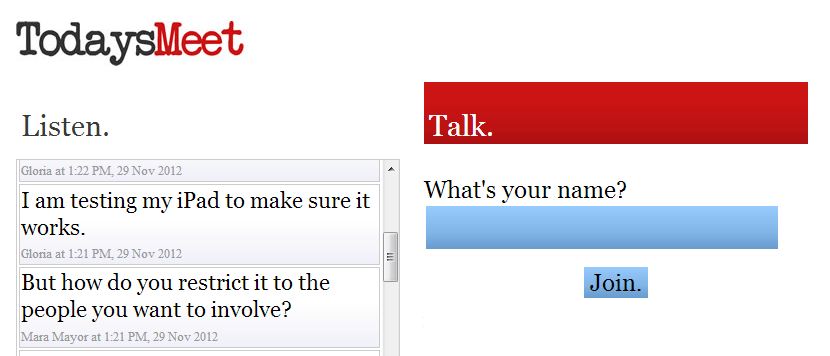
 I have been using a simple tool when teaching via webinar, TodaysMeet.com. It is being used in education for a variety of other purposes. Let me explain how I use the tool, I’ll show you how it works and then share some other uses.
I use it as a back channel for participants to ask questions. The term back channel is used in politics and diplomacy to mean “a secret, unofficial, or informal channel of communication” (The Free Dictionary) It is also used to describe “ the practice of using networked computers to maintain a real-time online conversation alongside the primary group activity or live spoken remarks” (Wikipedia) The chat feature offered by most web conferencing tools is a type of of back channel. To get people accustomed to the tool I use it first as a warm up activity. I ask people to share something new they have recently learned. The activity helps me get to know the participants and they use the TodaysMeet application. This way I know they can use it when and if they chose. I then invite participants to give me feedback or ask questions during the webinar training session. It has worked well especially when working with larger groups when my ability to hear individuals is compromised. Even in smaller groups, it gives participants another avenue to ask a question.
This link will take you to a demonstration on how to set up a meeting and how to contribute. This tool is free and easy to use. No account needed.
Here are some examples of how others have used the tool.
Here are some options:
- Backchannel chat
Check out the room I have created and leave a comment. http://backchannelchat.com/chat/kk8pv. It is sort of cool that you can add a video. It looks like you have be able to create up to 20 rooms for free with 30 concurrent students. For $15/year you can create unlimited rooms for 50 concurrent students. You also have access to the full transcript. - Yo!
Teach
http://palms.polyu.edu.hk/educational-apps/yoteach/ I like that you can add a picture and draw as well as type. The room URL is very long. It also seems to be very much in beta mode.
The Yo! Teach room I created. https://palms.polyu.edu.hk:8448/chat-desktop/room/5b38f1afa6a0f308b54cbaf4
 I have been using a simple tool when teaching via webinar, TodaysMeet.com. It is being used in education for a variety of other purposes. Let me explain how I use the tool, I’ll show you how it works and then share some other uses.
I use it as a back channel for participants to ask questions. The term back channel is used in politics and diplomacy to mean “a secret, unofficial, or informal channel of communication” (The Free Dictionary) It is also used to describe “ the practice of using networked computers to maintain a real-time online conversation alongside the primary group activity or live spoken remarks” (Wikipedia) The chat feature offered by most web conferencing tools is a type of of back channel. To get people accustomed to the tool I use it first as a warm up activity. I ask people to share something new they have recently learned. The activity helps me get to know the participants and they use the TodaysMeet application. This way I know they can use it when and if they chose. I then invite participants to give me feedback or ask questions during the webinar training session. It has worked well especially when working with larger groups when my ability to hear individuals is compromised. Even in smaller groups, it gives participants another avenue to ask a question.
This link will take you to a demonstration on how to set up a meeting and how to contribute. This tool is free and easy to use. No account needed.
Here are some examples of how others have used the tool.
- Penny Kuckkahn: The best example would be when a group 4-5 were interviewing some community members at the museum the students took notes using the tool. Then they had all the notes in one place and created a presentation from those notes. Rather than having to pull together their handwritten notes.
- Penny Kuckkahn: When several people go to the same conference together It is a great way to keep connected and know where each other are going and what is happening at the sessions. You also then have all resources right there for you after.
- Angie Rondello: A colleague of mine has used it while the class watched a movie. Students were able to comment and ask questions while the movie was going without interrupting the movie. (students used school laptops or their own device)
- Angie Rondello: I've been in a sectional workshop where they used it for the audience members to ask questions. The feed was displayed via LCD projector and there was a panel answering the questions and/or the main presenter would answer during the presentation.
- Deirdre Bonnycastle. Use by study groups or for meet ups - easier than Twitter.
- Gloria Hofer. This is a great way to aggregate student's thoughts, questions and reactions during a lecture and then capture it in the transcript!
Sunday, November 04, 2012
#CFHE12 Wk #4 my favorite speakers
The focus of week four was on the impact of data analytics on education: is it a fad? What are the consequences of data-driven education? How does (or should) this drive change in higher education? My favorite speakers this week were John Baker, Founder, President & CEO and Erik Duval, Professor at Katholieke Universiteit Leuven.
Erik Duval, spoke about Open Learning Analytics October 31 session with Erik Duval (slides) His focus is on
using learning analytics to make the student and the teacher more powerful. Dashboards are designed to help learners visualize their learning so they can be better drivers of their learning, thus more powerful.
I especially like how Eric likened the learning analytics movement to what is called quantified self. Data is used to trigger self-reflection. The Quantified Self is “a movement to incorporate technology into data acquisition on aspects of a person's daily life in terms of inputs (e.g. food consumed, quality of surrounding air), states (e.g. mood, arousal, blood oxygen levels), and performance (mental and physical).[1] (http://en.wikipedia.org/wiki/Quantified_Self)
Highlights from our Nov 2nd #CFHE12 sMOOCher “Meetup”
SMOOCHERS: Smart MOOCs Higher Education Research Subgroup Oct8-Nov18 Current/Future Hi Ed tlt.gs/SMOOCHERS tlt.gs/CFHE12
Process tips. WHAT CAN WE DO TO MAKE MOOC EXPERIENCES MORE USEFUL TO PARTICIPANTS?
Process tips. WHAT CAN WE DO TO MAKE MOOC EXPERIENCES MORE USEFUL TO PARTICIPANTS?
- Clarify availability of resources before, during, esp. AFTER the scheduled time of the MOOC
- "One-Click" link to login, AND to get to recording after
- In order for learning to take place the learner needs DO something with the content. "Requirements" might be useful... vs. "recommendations" vs. laissez faire ??? When is a "requirement" not a "requirement"? "Assignment"???? WHAT CAN WE DO TO MAKE "REQUIREMENTS" OR "ASSIGNMENTS" MORE EFFECTIVE? CHANGE THE NATURE OF THE REQUIREMENTS? CHANGE THE RELATIONSHIPS? HAVE SYNCHRONOUS SESSIONS WHICH WOULD EMBARRASS THOSE WHO HAVE NOT KEPT UP? BE CAREFUL... that "requirements" don't work as DISINCENTIVES to participation in sync sessions (for fear of being embarrassed by revealing non-compliance or non-preparation)
- Is attending a MOOC like auditing a course?
- Frank Parker suggested creating different layers of involvement. The first layer may be one of exploration with the content, the next layer would consist of more involvement with the content. providing this framework may help people with different goals know how to navigate the course.
- Steve Kaufman suggested that we are in such a rush to put things online, that we don't think about how content is being delivered. Let alone, effectiveness
- Completing or surviving a MOOC. Frank Parker suggests that completing a MOOC may be complete nonsense. What participants may want to do is to take a taste and move on.
- Dale Parker would like to see the whole course and all material at the beginning so can pick and chose what to participate in and access.
- Finding a cohort with like interests may help promote dialogue and conversation.
Thursday, November 01, 2012
#CFHE12 sMOOCher “Meetup” Friday, Nov2, 1:00 PM ET
The TLT sMOOCher (Smart MOOCs Higher Education Research Subgroup) group is what Paul Glader refers to as a MOOC “meetup” in his blog post How In-Person Meetups Are Fixing The Problem With MOOCs. (reference via Penny Kuckkahn.) This is our time to add some love to what Nan Zingrone reminded us could be a loveless MOOC. We will talk together about the content of #CFHE12 week 4 and the impact of data analytics on education:
- Is it a fad?
- What are the consequences of data-driven education?
- How does (or should) this drive change in higher education?
Please put November 30th and Dec 7th on your calendar for our
final MOOC report out during FridayLive. The exact date will be determined soon.
This link will take you to a summary of insights from our October 26th FridayLive midterm report as well as some individual goals for the second half. Please add your goals.
See you Friday!
Wednesday, October 31, 2012
#CFHE12 How do I leverage the "massive" part of the MOOC?
I am really enjoying the speakers each week and appreciate the content and resources. One of my goals is to figure out how to leverage the "massive" part of the MOOC. I am open to suggestions. Here are some of my strategies:
I listened to the informal discussion by the course facilitators last Friday. It was interesting to understand the rational for offering some many different ways to access and interact. The idea is to offer all these options so participants can chose the one(s) they are most comfortable in using. Caroline Haythornthwaite will be speaking on Thursday. In her paper SOCIAL NETWORKS AND INTERNET CONNECTIVITY EFFECTS she explorers different characteristics of social networking ties and the impact on group interaction.
- I think I have figured out how to connect my blog to the course and have started to post some blog messages of my own.
- I want to respond to some blog posts of others that appear in the course newsletter.
- I have downloaded TweetDeck at the suggestion of my colleague, Penny Kuckkahn. This has helped me view just the tweets from the course.
- I'd like to submit my own Tweets.
I listened to the informal discussion by the course facilitators last Friday. It was interesting to understand the rational for offering some many different ways to access and interact. The idea is to offer all these options so participants can chose the one(s) they are most comfortable in using. Caroline Haythornthwaite will be speaking on Thursday. In her paper SOCIAL NETWORKS AND INTERNET CONNECTIVITY EFFECTS she explorers different characteristics of social networking ties and the impact on group interaction.
Subscribe to:
Posts (Atom)