Wednesday, January 23, 2013

Designated Learner Experiment Continues


The Designated Learner Experiment continues.  Irene Knohk taught me how to use JING to capture a screen and to create a video.

Below are Steve Gilbert's thoughts on our next steps:
This was a GREAT step forward.
Irene, would you be willing to do almost the same thing with Jing again?
I'd like to try it with 2 or 3 very small, very specific tasks/projects identified in advance and the goal of trying to get the learner to succeed on those 2 or 3 as quickly as possible... with enough time left at the end to discuss other features of Jing that people might find relevant and/or to respond to audience questions.  I think we should also continue to identify the list of tasks/features that we will NOT address during our session...
I also wonder if the model of TV cooking shows has some relevance...  some steps can be omitted or condensed because someone has taken  care of that in advance....
For example...

  • We list the prep that we would help our designated learner do in advance.  We make  a bigger deal in advance about the "worksheet" Irene prepared
  • Open Jing & Screencast accounts
  • Download Jing
  • Identify a location on the learner's computer where any Jing files will be saved and avail immediately
  • Identify a location (folder?) on the learner's Screencast account where any Jing files uploaded will be saved and avail immediately

What else could be handled this way in advance  AND WE COULD TELL PEOPLE THAT WE WERE DOING SO AND THAT THEY WOULD BE EXPECTED TO TAKE CARE OF THESE IN ADVANCE THEMSELVES IF THEY WANT TO BE ABLE TO FOLLOW ALONG IN REAL TIME...
What do you think?
Steve

I love Steve's cooking show analogy.  I am also thinking we may want a place for people to be able to go after the session for more information and to view the recording, in other words, "to get the recipe."

One other thing we could add, either ask the participants for what they plan to do next and or suggest some things that they may want to do next that will help support and reinforce what they have learned in the session.  For example:  I want to go the JING and create a screen capture on my own so I don't forget what I have learned. Below is my latest achievement in that regard.

Saturday, December 15, 2012

Designated Learner

The TLT Group has been experimenting with real time learning using a designated learner. The context for our experimentation is Adobe Connect web conferencing. The content is an online application, in this case Google Forms.  A designated learner learns "in front" of others and serves as the voice of the learner for the other participants. 

These are the questions we are addressing through our experimentation in this area:

  • How can we make these "TRAINING"  sessions more useful to YOU and your colleagues?
  • For which conditions, context would this new approach be especially helpful?  Not helpful?
  • What should we try in this way next?

Gloria Hofer, Instructional Technology Resource Specialist, Santa Clara University, needs to be recognized for her bravery. Her expertise, patience and positive persistence during the session was a model in and of itself.


Here are the lessons we've learned so far:
  • PREREQUISITE INFORMATION - Include a link to the prerequisite information in the workshop announcement such as: background information or set-up information.  
    • In the case of our topic on Google forms that would include: establishing a Google Account and accessing Google Drive. We also wanted participants to open a second window on their computer and then be able to size the Adobe Connect window and the new window so they could be viewed side by side.  This information could have been provided as a screen cast.
    • Include a handout with the steps of the process.
  • BRIEFEST POSSIBLE ORIENTATION:
    • Very very brief recap from the pre-session info
    • How to make the Adobe presentation window full-screen and back to normal view. Chat is in normal view.
    • How to signal the presenter using emoticons: raise hand, slow down, etc.
    • Give the participants some options on how they might want to participate:
      • resize the Adobe window and a second browser so they can see the demonstration at the same time as they follow along
      • Toggle between the Adobe room and their browser as they listen and follow the instructions.
      • Use two computers or an iPad and a computer.
      • Use two monitors.
  • PART 2, DEMONSTRATION: Designated Learner is guided to RAPIDLY  produce something to completion - if very rudimentary
  • PART 3: instructor goes through more features  and responds to questions
  • Figure out how to manage the windows in Adobe in advance. This may vary based on the content and instructor preference.
  • NOTE: The variations between how things look if you are using a Mac versus if you are using a PC need to be taken into consideration.
  • How much should the designated learner and the expert communicate before the session.  Someone suggested that the questions from the designated learner be scripted to help move the content along.  On the other hand, the designated learner and expert would have no contact and the reactions and questions from the designated learner would be spontaneous.
  • During the demonstration, when the instructor is sharing their screen,use full screen.  Need a way for presenter to be able to see chat or hear to monitor what's going on.  Check this out.
  • Be careful about allowing unanticipated questions.

Our plan is to apply these lessons to a series of Member Exchange Workshops related to Social Media/Networking Tools/Resources. planned for January 9, 23 and Feb 13th. This link will take you to the registration page
Claire Dailey


Friday, November 30, 2012

Using a Back Channel - Life after TodaysMeet

Update July 2 2018. Sadly TodaysMeet has retired. Now to find a replacement. Newsletter "TodaysMeet is Shutting Down - Six Alternatives to Try"

Here are some options:


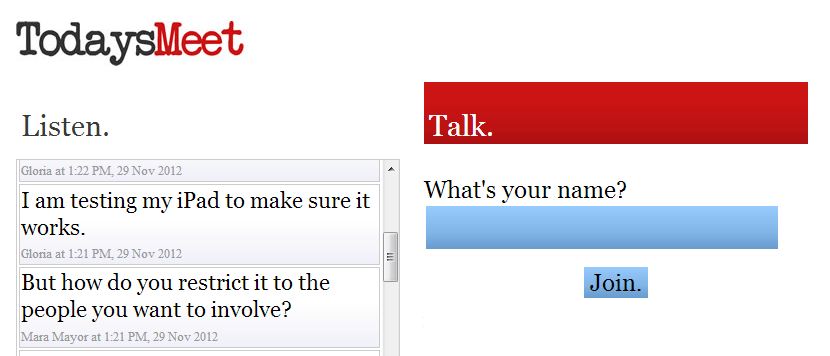
I have been using a simple tool when teaching via webinar, TodaysMeet.com. It is being used in education for a variety of other purposes. Let me explain how I use the tool, I’ll  show you how it works and then share some other uses.

I use it as a back channel for participants to ask questions. The term back channel is used in politics and diplomacy to mean “a secret, unofficial, or informal channel of communication” (The Free Dictionary) It is also used to describe “ the practice of using networked computers to maintain a real-time online conversation alongside the primary group activity or live spoken remarks” (Wikipedia) The chat feature offered by most web conferencing tools is a type of of back channel. To get people accustomed to the tool I use it first as a warm up activity.  I ask people to share something new they have recently learned.  The activity helps me get to know the participants and they use the TodaysMeet application.  This way I know they can use it when and if they chose. I then invite participants to give me feedback or ask questions during the webinar training session.  It has worked well especially when working with larger groups when my ability to hear individuals is compromised.  Even in smaller groups, it gives participants another avenue to ask a question.

This link will take you to a demonstration on how to set up a meeting and how to contribute. This tool is free and easy to use.  No account needed.

Here are some examples of how others have used the tool.

  • Penny Kuckkahn: The best example would be when a group 4-5 were interviewing some community members at the museum the students took notes using the tool.  Then they had all the notes in one place and created a presentation from those notes.  Rather than having to pull together their handwritten notes.
  • Penny Kuckkahn: When several people go to the same conference together It is a great way to keep connected and know where each other are going and what is happening at the sessions. You also then have all resources right there for you after.
  • Angie Rondello: A colleague of mine has used it while the class watched a movie. Students were able to comment and ask questions while the movie was going without interrupting the movie. (students used school laptops or their own device)
  • Angie Rondello: I've been in a sectional workshop where they used it for the audience members to ask questions. The feed was displayed via LCD projector and there was a panel answering the questions and/or the main presenter would answer during the presentation.
  • Deirdre Bonnycastle. Use by study groups or for meet ups - easier than Twitter.
  • Gloria Hofer. This is a great way to aggregate student's thoughts, questions and reactions during a lecture and then capture it in the transcript!

Sunday, November 04, 2012

#CFHE12 Wk #4 my favorite speakers


The focus of week four was on the impact  of data analytics on education: is it a fad? What are the consequences of data-driven education? How does (or should) this drive change in higher education? My favorite speakers this week were John Baker, Founder, President & CEO and Erik Duval, Professor at Katholieke Universiteit Leuven.

Erik Duval, spoke about Open Learning Analytics October 31 session with Erik Duval  (slides) His focus is on
using learning analytics to make the student and the teacher more powerful.  Dashboards are designed to help learners visualize their learning so they can be better drivers of their learning, thus more powerful.


I especially like how Eric likened the learning analytics movement to what is called quantified self.  Data is used to trigger self-reflection. The Quantified Self is “a movement to incorporate technology into data acquisition on aspects of a person's daily life in terms of inputs (e.g. food consumed, quality of surrounding air), states (e.g. mood, arousal, blood oxygen levels), and performance (mental and physical).[1] (http://en.wikipedia.org/wiki/Quantified_Self)


Highlights from our Nov 2nd #CFHE12 sMOOCher “Meetup”

SMOOCHERS: Smart MOOCs Higher Education Research Subgroup Oct8-Nov18 Current/Future Hi Ed tlt.gs/SMOOCHERS tlt.gs/CFHE12
Process tips. WHAT CAN WE DO TO MAKE MOOC EXPERIENCES MORE USEFUL TO PARTICIPANTS?

  • Clarify availability of resources before, during, esp. AFTER the scheduled time of the MOOC
  • "One-Click" link to login, AND to get to recording after
  • In order for learning to take place the learner needs DO something with the content. "Requirements" might be useful...  vs.  "recommendations"  vs.  laissez faire ??? When is a "requirement" not a "requirement"?   "Assignment"???? WHAT CAN WE DO TO MAKE "REQUIREMENTS" OR "ASSIGNMENTS" MORE EFFECTIVE?  CHANGE THE NATURE OF THE REQUIREMENTS?  CHANGE THE RELATIONSHIPS?  HAVE SYNCHRONOUS SESSIONS WHICH WOULD EMBARRASS THOSE WHO HAVE NOT KEPT UP? BE CAREFUL...  that "requirements" don't work as DISINCENTIVES to participation in sync sessions (for fear of being embarrassed by revealing non-compliance or non-preparation)
  • Is attending a MOOC like auditing a course?
  • Frank Parker suggested creating different layers of involvement.  The first layer may be one of exploration with the content, the next layer would consist of more involvement with the content. providing this framework may help people with different goals know how to navigate the course.
  • Steve Kaufman suggested that we are in such a rush to put things online, that we don't think about how content is being delivered. Let alone, effectiveness
  • Completing or surviving a MOOC. Frank Parker suggests that completing a MOOC may be complete nonsense. What participants may want to do is to take a taste and move on.
  • Dale Parker would like to see the whole course and all material at the beginning so can pick and chose what to participate in and access.
  • Finding a cohort with like interests may help promote dialogue and conversation.

Thursday, November 01, 2012

#CFHE12 sMOOCher “Meetup” Friday, Nov2, 1:00 PM ET


The TLT sMOOCher (Smart MOOCs Higher Education Research Subgroup) group is what Paul Glader refers to as a MOOC “meetup” in his blog post How In-Person Meetups Are Fixing The Problem With MOOCs.  (reference via Penny Kuckkahn.) This is our time to add some love to what Nan Zingrone reminded us could be a loveless MOOC.  We will talk together about the content of #CFHE12 week 4 and the impact of data analytics on education:

  • Is it a fad?
  • What are the consequences of data-driven education?
  • How does (or should) this drive change in higher education?
Let's also talk about our #CFHE MOOC experience.

Please put November 30th and Dec 7th on your calendar for our
final MOOC report out during FridayLive. The exact date will be determined soon.

This link will take you to a summary of insights from our October 26th FridayLive midterm report as well as some individual goals for the second half.  Please add your goals.


See you Friday!

Wednesday, October 31, 2012

#CFHE12 How do I leverage the "massive" part of the MOOC?

I am really enjoying the speakers each week and appreciate the content and resources.  One of my goals is to figure out how to leverage the "massive" part of the MOOC. I am open to suggestions.  Here are some of my strategies:

  1. I think I have figured out how to connect my blog to the course and have started to post some blog messages of my own.
  2. I want to respond to some blog posts of others that appear in the course newsletter.
  3. I have downloaded TweetDeck at the suggestion of my colleague, Penny Kuckkahn. This has helped me view just the tweets from the course. 
  4. I'd like to submit my own Tweets.

I listened to the informal discussion by the course facilitators last Friday.  It was interesting to understand the rational for offering some many different ways to access and interact.  The idea is to offer all these options so participants can chose the one(s) they are most comfortable in using.  Caroline Haythornthwaite will be speaking on Thursday. In her paper SOCIAL NETWORKS AND INTERNET CONNECTIVITY EFFECTS she explorers different characteristics of social networking ties and the impact on group interaction.


Tuesday, October 30, 2012

FridayLive! Second #CFHE12 MOOC follow up

FridayLive! Second #CFHE 12 MOOC follow up
My notes from the October 26th sMOOChers (Smart MOOCs Higher Education Research Subgroup) midterm conversation about #CFHE12.

Nan Zingrone - Atlantic University coined this phrase in the chat “ loveless Moocs (xMoocs) have no discussion in them.”  Nan credits Nellie Deutsch of Integrating-Technology For Active Online Learners (www.integrating-technology.org) for the term loveless in reference courses with lectures plus exams only. “ No chance for participants to build relationship in loveless Moocs.”

We had a good discussion about the synchronous and asynchronous elements of the MOOC, who was using which ones and why.  We also talked about building community and different ways to accomplish this.

Priscilla Stadler persistently asked about how best to characterize MOOC pedagogy.  I’m not sure we really answered this question.

A summary of some of the MOOC tips, observations, and recommendations to help others learned as shared in the text chat.

  • Nan Zingrone - Atlantic University:i get turned off by the volume of the tweet feed; I have subscribed only to the introductions that I'm responded to, and otherwise it's using the Newsletter to remind me of what I'm interested in and where that can be found
  • Ilene Frank - The presentations have been eye-opening for me! One that Ilene recommended, October 22 session with Debra Quazzo
  • Andrea:Match content to learning outcomes that are stated on the Contents page.
  • Dale Parker:I have found resources on there that are useful ie the blended learning toolkit and some sites like Open Culture that I will share with other faculty and students
  • Steve Gilbert, TLT Group:IF: finding most recent webinars with $ focus "awakening!" - helpful.
  • Molly Baker:Is the role of the leaders of a MOOC to facilitate process and content is created by the community? Or is content created and communicated as a structure for the course and the dialog is directed at that structure/content?
  • Henry Merrill:Mooc concierge? If my purpose in participating in a MOOC is to get immersed in the content , then I need to dive in. If I'm wanting to skim it for best practices and new ideas, then a concierge would be helpful.
  • Nan Zingrone - Atlantic University:sort of like categorizing stuff up in Scoop.it or Pinterest, that's curation. Perhaps when a MOOC is set up, at least the loaded materials can also have click-offs leading you there in a table of contents, or at the learning objectives spot for each of use
  • Steve Gilbert, TLT Group:HOSTS for beginners
  • Ilene Frank:Teaching undergrads to develop a personal learning network can be one of the purposes.
  • Nan Zingrone - Atlantic University:that's what Moodle for Teachers in www.integrating-technology.org training courses have done for me: connected me to online educators all over the world, and then they become my PLN with a really rich cultural dimension to it (I've been taking these Moodle training courses on and off for several years, some of which were MOOCs)

Goals for the second half of the MOOC. Results to be shared During FridayLive on November 30th, 2:00 pm ET Third sMOOChers Cohort Follow UP Register for free here.

  • Beth Dailey:I want to try to leverage the massive part of the course. This past week I tried expanding my social networking skills within the #CFHE12 MOOC by connecting my own blog, twitter account & Google Reader. Next week I plan to learn how to use TweetDeck.
  • Dale Parker: I just see this as a cultural revolution and I just want to watch and learn about the changes.
  • Nan Zingrone - Atlantic University:I love the MOOC, and I love the sMOOChers add on, but I'm building Moodle training for my faculty and students at our online grad school at the minute so can't be anything but verbal in the webinars I can get into; but I owe you guys and will try to help in the future. Maybe Nan would be willing to further elaborate on this comment: Nan Zingrone - Atlantic University:but if you read and respond to introductions or blog posts you can get a conversation going and that helps build community, so that's what I've been doing.
  • moy@sepche.org: This is Beth again. Perhaps keep a running list of the roles that faculty would play in a MOOC and the skills they would need to play the roles effectively. Beth agreed to synthesize, summarize list of good/useful intermediate roles for faculty making MOOCs more useful to learners, colleague?
  • Priscilla Stadler: I'm interested in the possible value of MOOCs for teaching and learning at an urban community college (LaGuardia /CUNY)
  • Henry Merrill: I'm going to register for the Ed Future MOOC - a session to reflect on that experience after it closes might be be useful?

Friday, October 26, 2012

sMOOChers: Smart MOOCs Higher Education Research Subgroup [#CFHE12}

The TLT Group is offering an opportunity to explore a MOOC and talk together not only about the topic but about the MOOC experience. The MOOC we have chosen is the "Current/Future State of Higher Education" (#CFHE12).  This is the second MOOC that I have participated in and one of my goals is to better understand and leverage the social networking aspects of the course.
If you want to pop into the sMOOChers discussion please join us later today, 2:00 pm ET at tlt.gs/login.  It's midterm in CFHE12 and here is what we will be discussing.


Dale Parker will summarize and evaluate our 3 categories for reflection as we participate in CFHE12 and comment on implications for adult learners:


  • Process:  Reflection about Experience (about our shared experience in a MOOC as it happens - focus on process)
  • Content:  Adaptation and Application of Resources (to our own institutions and individual situations of the information and resources provided by the MOOC - focus on content)
  • Support:  Develop New Roles (to help students learn from MOOCs)

Nancy Smulsky will review and extend her comments about the quality and variety of resources within CFHE12, the effectiveness (or lack) of interactivities within CFHE12, and the significance of being unable to view/use MOOC resources prior to the week for which they are designated.  


Jane Harris will be unable to join us live on Oct 26, but will share some of her notes and list of recommended readings based on her experience within CFHE12 (and elsewhere).

Steve Gilbert will invite more discussion about the role of scheduled synchronous events within MOOCs and other online educational activities.  He will ask participants about their own experiences with synchronous online elements within larger courses, MOOCs, programs, including these and other questions:


·       In what ways are scheduled synchronous online sessions helpful to learners who prefer or need more external structure and guidance for their own learning, even when those learners are highly motivated to master the course content?  In what ways does it matter, if at all, if the synchronous sessions are required, recommended, or purely optional?
·        In what ways do scheduled synchronous online sessions deter learners who prefer or need flexible schedules from participating in online courses, MOOCs, et al. ? In what ways does it matter, if at all, if the synchronous sessions are required, recommended, or purely optional?
·       In what ways does it matter, if at all,  which media are used and which kinds of equipment are required for synchronous sessions?  Pure text?  Multi-way voice via telephone?  Webinar?  Two-way video?  Etc.

We will also discuss additional plans and questions to enhance our participation in the last weeks of CFHE12 and guide our preparation of final comments during FridayLive!  November 30, 2012.  NOTE:  Jane Marcus offered to prepare some notes and comments - based on her recent observations of MOOC-like developments at Stanford and elsewhere -  in time for the final session.


Thursday, May 10, 2012

My reflections from Week Two of the MOOC on how to address diversity and learning styles in an online course and the R2D2 model.


Thursday, April 26, 2012

Vocaroo + Wordle + e-mail + LMS

I asked Penny Kuckkahn, Instructional Designer/Faculty Development Coordinator, for the easiest way to produce a voice recording and she referred me to Vocaroo. This is truly a simple application.  You don't need to sign up and you immediate get a URL and can even embed the recording. Below is the recording I made summarizing the work we had been doing in a blended learning course I am teaching, Academic Mgt. 101.

Voice Recorder >>

I sent the voice recording to my students via e-mail with a word cloud image created from the script.  I used Wordle to produce the word cloud. Developing the script was the hardest part of the process.

Wordle: Program Outcomes Assessment

Thanks Penny!


Beth

Monday, January 16, 2012

Story – A Strategy for Generating Ideas

We know that stories make information come alive and are a great way to connect learners to new information and concepts.  Meaning and involvement become more personal for the learner when stories are involved. This is an example of how story was used during an advisory committee meeting as a way to generate ideas from members.  In this case advisory committee members were asked to individually create their own story.  This story would be rich in detail  and would depict someone in the community that would benefit from completing an associate degree in the Business Management program.  They were given five minutes to write their stories.  Each member shared their story while someone outlined the important details on an individual flip chart page.  Next, the group was paired up with an advisory committee member and a college representative.  The pairs reviewed the various pages and brainstormed ways to connect with the person in the story. Ideas were captured on post-it notes.  What resulted from this activity were new ideas and very rich information.  The advisory committee members reported enjoying the experience.

This example comes to us from Karen Barr, Beth Kost and Dianne Lazear.  October 2011

Creating a Story from a Picture

Story can be used in every phase of the learning cycle.  This is an example of how story is used in the “generalizing” phase. It comes to us from Sherry Nazer, a student in Dianne Lazear’s Business Management class.  Dianne was teaching a unit on ethics.  The students were asked to create a learning activity around the concepts they had been studying and then facilitate the activity in the class. If they created a game they needed to supply the answer key to the game. While studying this unit, Dianne displayed various ethical principles on posters around the classroom.  Sherry gave each student a different picture and asked them to create a story from the picture that pulled in one of the ethical principles. Dianne reported a high level of intense engagement as the students developed their stories which were then individually shared. The photos combined with the stories made the information come alive in a personal way. You can see how various aspects of the brain were engaged. The pictures evoked emotion and triggered memories.  Both the right and left sides of the brain were involved with the right brain looking for the big picture and meaning while the left brain fills in the details. 

Teaching and Leadership

I reconnected recently to the field of leadership. I am taking a class on instructional design from Dee Fink and am reading his book "Creating Significant Learning Experiences: An Integrated Approach to Designing College Courses." When talking about teacher credibility, Fink draws from the work of Kouzes and Polzner and highlights these three characteristics: competence (knowledge of the subject), trustworthiness (have the best interest of the student at heart), and dynamism (excited about the subject).

This lead me to revisit the books that I have on leadership.  I plan to share a summary every so often.  Below is a summary from Frances Hesselbein's book. My life in leadership: The journey and lessons learned along the way.

There are several key take aways from this book, one is that leadership is done in the spirit of service. Another has to do with inclusion and the role the leader plays in helping people grow the mission in their hearts and minds so they can express it everyday in their work.  Hesselbein suggests that this is how you grow the organization of the future. She describes how she implemented what she calls circular management versus hierarchical command and control, in her role as the CEO of the Girl Scouts of America and now as the CEO of the Leader to Leader Institute. Hesselbein defines leadership this way. "Leadership is a matter of how to be, not how to do. You and I spend most of our lives learning how to do and teaching others how to do, yet it is the quality and character of the leader that determines performance, the results. Leadership is a matter of how to be, not how to do" (p.89).  She suggests that we use the power of saying no as a way to define ourselves and out organizations. Being true to our values and our personal and organizational mission requires saying no. It enhances the ethical performance of the leader and the organization. I love this quote from President Lincoln.

     I am not bound to win,
     But I am bound to be true.
     I am not bound to succeed,
     But I am bound to live
     Up to the light I have.

Thursday, September 29, 2011

A Recipe for Creating Significant Deep Learning Experiences

I was thinking that it would be fun to work with some great teachers and share some ideas on how the framework for create significant deep learning experiences could be applied.  We would use a recipe metaphor and model after cooking shows.  Here are some very preliminary thoughts. Once we worked out the details we would share the demonstration during a TLT Group FridayLive Session.  Let me know what you think?

With every recipe there are ingredients.  I think we would create a scenario and provide the following information:

Name of the recipe or is this case the outcome:________________

The ingredients:
  • The course
  • The competency
  • The topic
  • The audience
  • The setting
  • Other ingredients:__________________
The directions:
Demonstrate how the outcome is achieved using the following framework:
  • A coherent knowledge structure.
  • Assessment strategies where learners are presenters and performers of their learning.
  • Active learning tasks that also involve long term engagement.
  • A positive and challenging environment.  It is all about the learner and their learning.

Tuesday, June 28, 2011

Play and learning

I have been mulling over comments made about games and learning at a recent meeting.  Games were laughed at as being a waste of time, not professional and certainly not connected with learning. This has left me scratching my head because it flies in the face of what I know about the brain and learning.  In the monograph I wrote on creating deep learning experiences, I contrasted surface and deep learning.  One of the contrasts was this. Deep learners "are mindful; play and create with new ideas, relate theory to everyday life. Learners enjoy learning, the process flows "  Surface learners "take a mindless approach; entrapped in old ideas, the content is devoid of significance. Learners find learning to be unpleasant."

I plan to do more thinking and research on this perspective.  Maybe it is merely a semantic issue. I have recently listened to some great presentations from TEDD on this topic.
  1. Tim Brown on Creativity and Playhttp://www.ted.com/talks/lang/eng/tim_brown_on_creativity_and_play.html
    At the 2008 Serious Play conference, designer Tim Brown talks about the powerful relationship between creative thinking and play -- with many examples you can try at home (and one that maybe you shouldn't).
  2. Steve Keil: A manifesto for play, for Bulgaria and beyond

    http://www.ted.com/talks/steve_keil_a_manifesto_for_play_for_bulgaria_and_beyond.htmlAt TEDxBG in Sofia, Steve Keil fights the "serious meme" that has infected his home of Bulgaria -- and calls for a return to play to revitalize the economy, education and society. A sparkling talk with a universal message for people everywhere who are reinventing their workplaces, schools, lives.
  3. Stuart Brown says play is more than fun

    http://www.ted.com/talks/lang/eng/stuart_brown_says_play_is_more_than_fun_it_s_vital.htmlA pioneer in research on play, Dr. Stuart Brown says humor, games, roughhousing, flirtation and fantasy are more than just fun. Plenty of play in childhood makes for happy, smart adults -- and keeping it up can make us smarter at any age.


Tuesday, May 03, 2011

Accelements - Elements of Accelerative Learning and Teaching

I just completed a great webinar series with Paul Scheele from Learning Strategies Corporation, Accelements - Elements of Accelerative Learning and Teaching." Not only did I learn some cool things about accelerated learning but I came away with some cool ideas to improve my WebEx design and delivery. Here is what I have so far:

How to use WebEx Polling Questions to Promote Deep Learning

I am on a quest to find ways to utilize web conferencing software to create deep learning experiences. The Winter 2011 POD Network News contained a great article by Derek Bruff, “Multiple-Choice Questions You Wouldn’t Put on a Test: Promoting Deep Learning Using Clickers,”  The polling feature in WebEx and clickers will create similar results.  This is how it works: participants respond anonymously which makes it safer to share their perspectives and to take risks; their results are displayed which in turn generates greater interest in discussion as multiple perspectives are revealed.
Bruff (2009-2001) suggests four question types:
1.      One-Best-Answer Question. In this situation, there is more than one defensible answer. Participants are asked to commit to one answer, the results are displayed and a discussion takes place as to why various answers were chosen.
Example: present a short scenario and then pose a question to the group, such as, “select the best option to explain the characters motivation.
2.      Student Perspective Question. Participants are asked to share opinions and personal experiences. These types of questions can help participants personally connect to the content.  When viewing the results they also begin to understand each other a little better and possibly appreciate multiple perspectives.
Example: could ask student views on a current event or to share what type of personal experience they may have had related to the topic.
3.      Misconception Question. A question is chosen that will surface common misconceptions. After the results are displayed, Bruff suggests that participants be given time to discuss in small groups.  The WebEx breakout group feature could be used for this.  After small group discussions, the question is posed again and then a large group discussion takes place around the reasons for and against the various answers.
4.      Peer Assessment Question. Participants are given an opportunity to provide feedback on a fellow participant’s presentation. Anonymous feedback tends to be more honest and constructive and can lead to good discussion regarding discipline standards.
“Based on various definitions for deep learning and what we know about the brain and learning, deep learning involves five traits: (a) focusing on the big picture, the overall meaning, pattern, or principle; (b) connecting new ideas to previous knowledge and personal experience and ultimately fitting these into a coherent whole; (c) linking with internal learning goals; (d) processing actively by being open, creative, and curious; and (e) embracing change, new situations, and multiple perspectives” (Dailey, 2011, p.9). By utilizing questions in this fashion, experiences are created where participants connect new ideas to personal experience and link their learning goals as they think independently in answering the questions.  By seeing the results of the poll, participants are more likely to actively process through discussion and become aware of and appreciate multiple perspectives.
References
Bruff, D. (2009-2010). Multiple-Choice Questions You Wouldn’t Put on a Test: Promoting Deep Learning Using Clickers. POD Essays on Teaching Excellence.  Accessed May 3, 2011 http://www.podnetwork.org/publications/teachingexcellence/09-10/V21,%20N3%20Bruff.pdf. 
Dailey, B. (2011). Creating Significant Deep Learning Experiences. The Cross Papers Number 14. League for innovations in the Community College.

Friday, February 25, 2011

Creating Significant Deep Learning Experiences

February 27th is the end of the journey.  I will be sharing some ideas from the work I have been doing on creating significant deep learning experiences as a part of the Cross Paper Fellowship.  Cross Paper, Number 14 is complete.

Thank you all for supporting me along the way. I have learned so much throughout this project. Now to put all I have learned into practice. I recently viewed a Ted talk that inspired me. It is titled "Lewis Pugh's mind-shifting Everest swim." He ends his talk with this question related to the environment.  I think you can apply the question to our work as teachers.  He asks us to think of one radical tactile shift that we think we can make and then commit 100% to doing it. The journey continues. I hope you enjoy http://www.ted.com/talks/lewis_pugh_s_mind_shifting_mt_everest_swim.html